

Quick way to run SWOT in Google Sheets using the AI for Sheets add‑on.
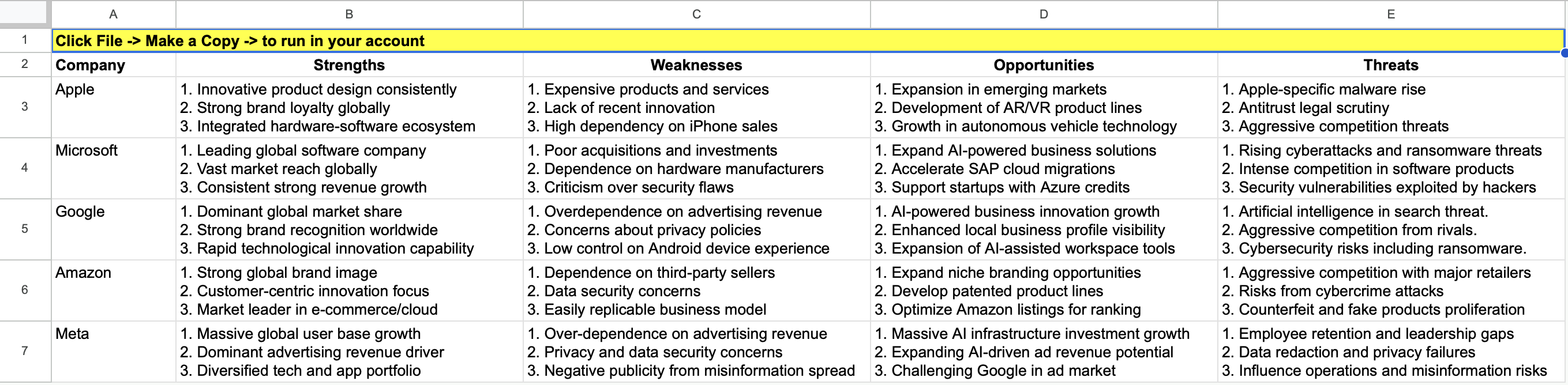
Template: Open in Google Sheets
Sheet setup
Use this simple layout:
| Company | Strengths | Weaknesses | Opportunities | Threats |
|---|---|---|---|---|
| Apple | ||||
| Microsoft | ||||
| Amazon | ||||
| Meta |
Formula
Put this in B3, then copy right to E3 and fill down to all rows.
It reads the category from the header (e.g., B$2) and the company from column A (e.g., $A3).
=AISEARCH("List out 3 " & B$2 & " of this company, each point within 5 words, use numbering listing: " & $A3)
That’s it. Simple, fast, and repeatable for any list of companies.