
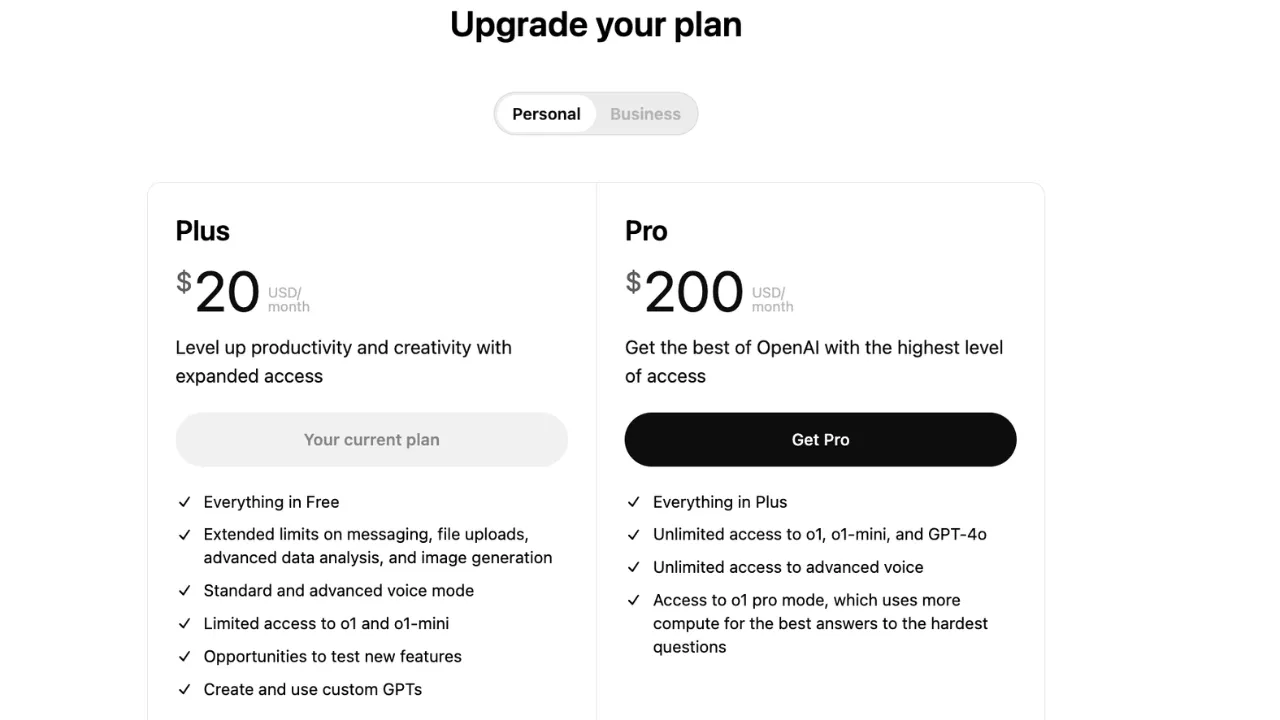
Quick take: if you are choosing mainly because of Codex, the decision is no longer just ChatGPT Plus vs Pro. Plus is the paid individual baseline among the plans compared here, Pro is the individual upgrade path for heavier Codex sessions, and Business is mainly for teams that need shared workspace controls. OpenAI can change exact Codex limits, model caps, and temporary promos, so treat official plan pages as the source of truth before upgrading.
Selected facts checked September 9, 2026: Free and Go also include limited Codex usage, so Plus is not required just to try it. Pro tiers, allowances, the Pro tiers screenshot and the Sora API date were rechecked October 2, 2026. The original comparison and other screenshots date from around June 2026; the alternative-plan prices and images have not been refreshed as part of this correction.
ChatGPT Plus vs Pro vs Business: What Actually Changes in 2026
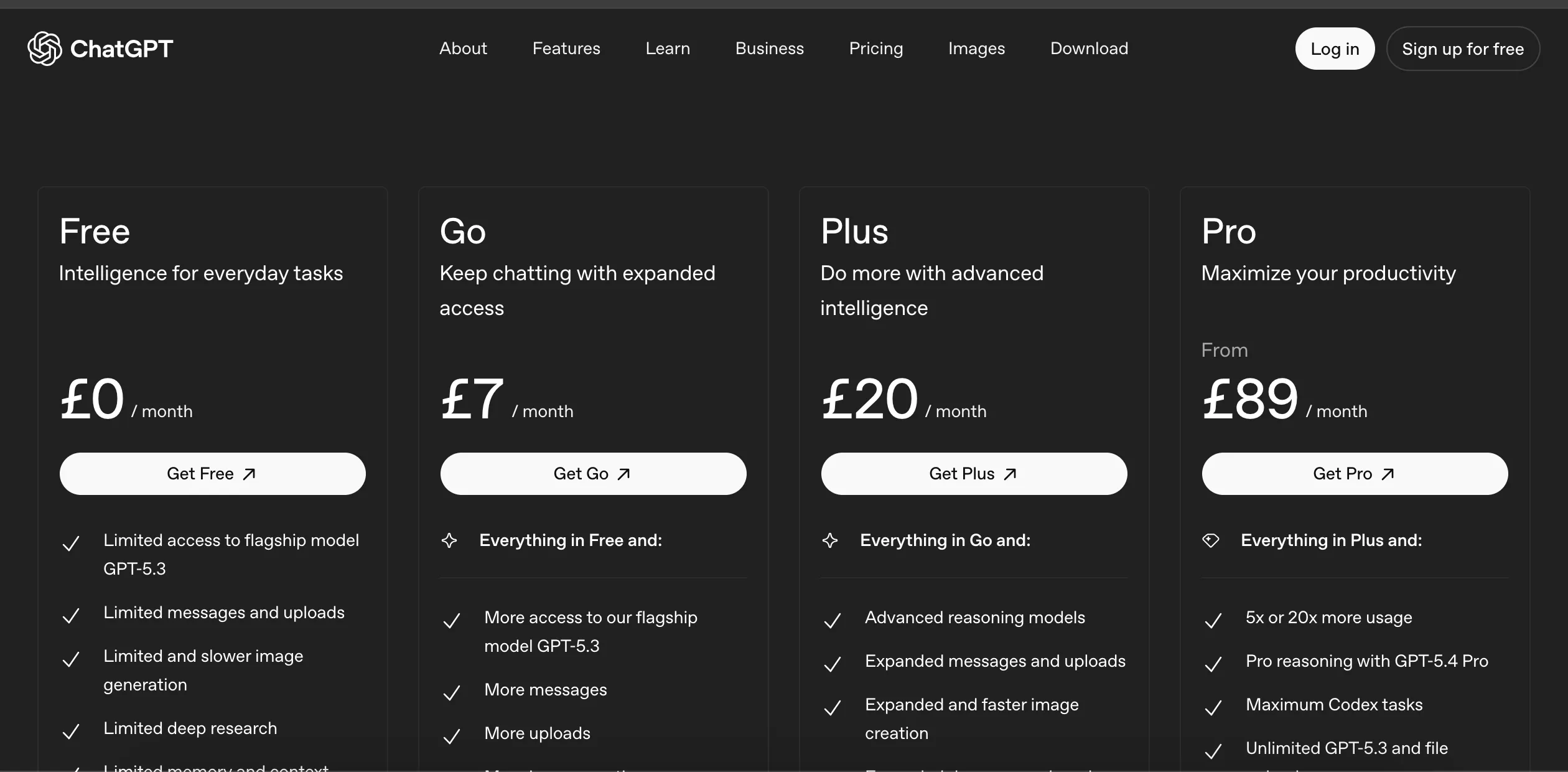
This comparison is based on OpenAI’s public pricing, Codex pricing, release notes, and help-center documentation checked around June 2026. The key thing to understand: Codex limits are usually presented as plan allowances and relative headroom, not a single universal token number that applies forever to every account. Plan details, temporary promos, and model names can change quickly, so always confirm on official pages before purchasing.
- ChatGPT Plus ($20/month) : priority access during high traffic, higher limits than free usage, faster responses, advanced reasoning models, voice, image generation, file analysis, Deep Research tools, and custom GPT creation/use.
- ChatGPT Pro ($100/month) : the middle tier for heavier users, with more standard usage than Plus. OpenAI previously showed a temporary Codex promo through May 31, 2026; after that date, do not assume the promo still applies unless the official pricing page still shows it.
- ChatGPT Pro ($200/month) : more usage than Pro $100 for heavier daily users. It reopened to new subscriptions on September 29, 2026 with a lower included allowance; eligible existing subscribers keep the previous allowance through October 29, 2026.
- ChatGPT Pro ($500/month) : the highest included usage of the Pro tiers, and the only one with GPT-6 Astra Ultrafast and GPT-6.1 Sol Ultrafast.
- ChatGPT Business : best treated as a team/admin plan, not simply a personal Codex limit upgrade. It may be the right choice when you need shared billing, workspace controls, and multiple users.
ChatGPT Codex Limits by Plan in 2026
The safest way to compare ChatGPT Codex limits is by plan tier and upgrade purpose. OpenAI does not always publish one fixed Codex token limit that applies to every account forever. Instead, limits can depend on your plan, the model, temporary promotions, workspace settings, and OpenAI’s current policy.
| Plan | How to think about Codex usage | Best fit | Upgrade note |
|---|---|---|---|
| ChatGPT Plus | Paid individual baseline in this comparison; Free and Go also offer limited Codex usage. | Occasional coding, reviews, small agents, and lighter daily use. | Stay on Plus if you rarely hit caps. |
| ChatGPT Pro $100 | More individual headroom than Plus. This is the more realistic upgrade if Plus limits interrupt your Codex sessions. | Heavy individual Codex use, longer coding sessions, and frequent agent runs. | The smallest step up from Plus. |
| ChatGPT Pro $200 | More individual headroom than Pro $100. | Daily production coding workflows where ChatGPT/Codex is a core tool. | Open to new subscriptions again, with a lower allowance than before. Eligible existing subscribers keep the previous allowance through October 29, 2026. |
| ChatGPT Pro $500 | Highest individual headroom among the plans covered here. | Users who need the most usage or the Ultrafast models (GPT-6 Astra Ultrafast and GPT-6.1 Sol Ultrafast). | Only worth it if Pro $200 still limits you or you need Ultrafast. |
| ChatGPT Business | Team/workspace plan. Treat its Codex value as a workspace decision, not just a personal limit comparison. | Teams that need shared billing, admin controls, and multiple seats. | Choose Business for team management; choose Pro for a simpler individual Codex upgrade. |
In plain English: yes, ChatGPT Plus includes Codex, but it is not the minimum plan for access. If you are asking “what has higher Codex limits than Plus?”, Pro is an individual upgrade option. If you are asking “Plus vs Business for Codex?”, Business is mainly a team-controls and workspace-billing decision.
Hitting a cap does not always require a subscription upgrade. OpenAI lets Plus and Pro users buy additional credits for eligible Codex usage without changing plans. Compare occasional credit purchases with the recurring cost of a higher tier; you can also wait for a reset or use a smaller available model. API-key usage is billed separately from a ChatGPT subscription.
ChatGPT Pro $100 vs $200: What’s the Difference, and Should You Upgrade?
The main difference is usage allowance, not core features. OpenAI now offers three Pro tiers: $100, $200 and $500. Pro $200 includes more usage than Pro $100, Pro $500 offers the highest included usage, and only Pro $500 includes GPT-6 Astra Ultrafast and GPT-6.1 Sol Ultrafast. OpenAI’s pricing page previously showed a temporary Codex promo through May 31, 2026; after that date, do not assume the promo remains active unless the current official pricing page still lists it.
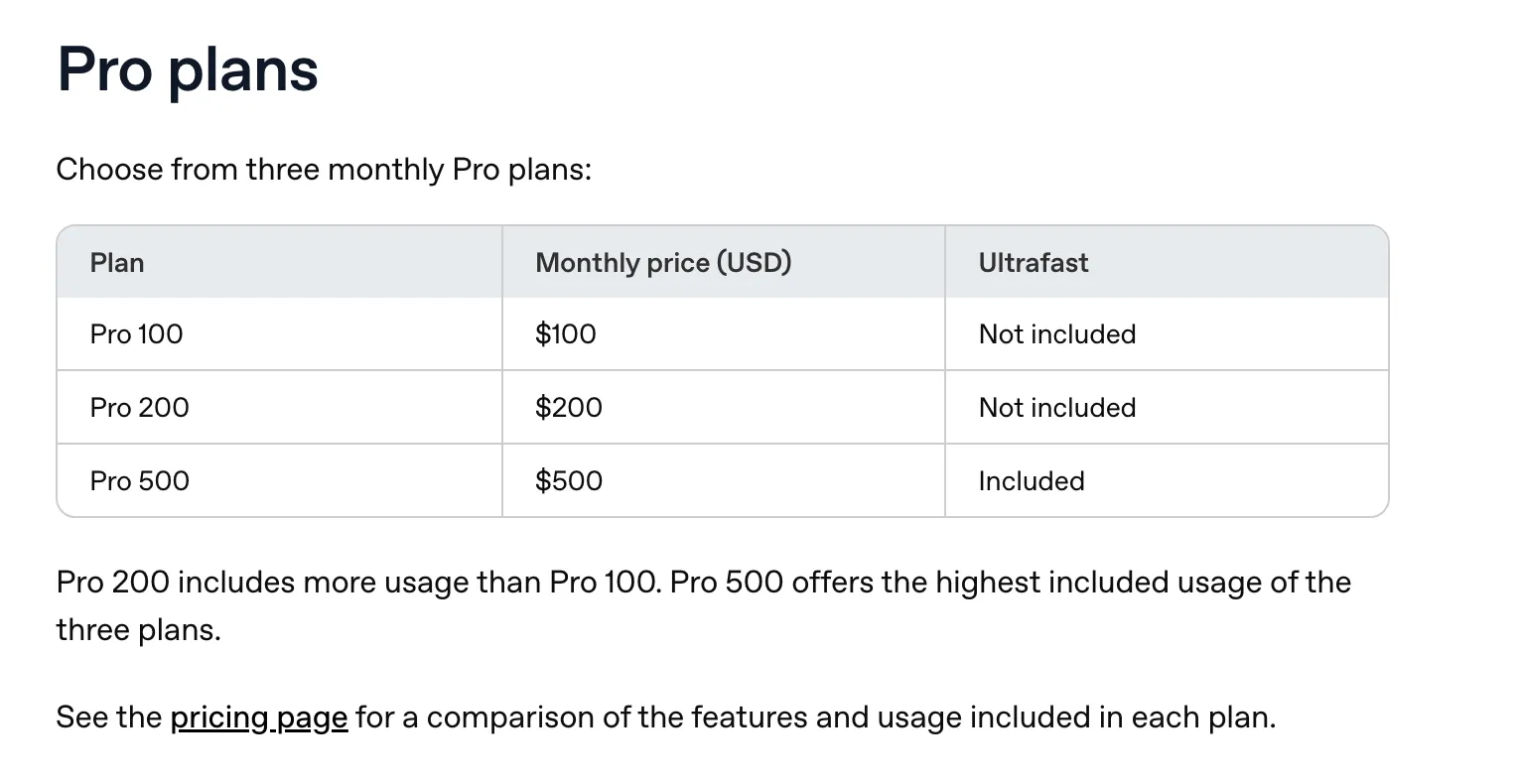
Stay on Plus if you rarely hit limits. For occasional overages, compare additional credits before upgrading. Consider Pro $100 if you hit Plus caps frequently enough to justify a higher recurring bill. Pro $200 reopened to new subscriptions on September 29, 2026, but new subscriptions that are not grandfathered get a lower allowance than before. If you had an active Pro $200 subscription at any point from September 22, 2026 through 10 a.m. Pacific Time on September 29, 2026, you keep the previous allowance through October 29, 2026 while your Pro $200 subscription stays active, then move to the lower allowance at the same $200 price. Choose Pro $500 only if Pro $200 still limits you or you need Ultrafast.
How to read the allowance table: OpenAI no longer publishes fixed 5x or 20x Plus multipliers for the Pro tiers, so the table shows only the relative order of allowances, not fixed token or task quantities. Model choice, task complexity, shared usage budgets and separate model or feature caps affect what you can actually complete. The same core Pro capabilities do not mean identical allowances everywhere.
| Plan | Price | Vs Plus price | Standard usage allowance | GPT-6 Astra / GPT-6.1 Sol Ultrafast | Note |
|---|---|---|---|---|---|
| ChatGPT Plus | $20 | 1x baseline | Baseline | No | Baseline |
| ChatGPT Pro $100 | $100 | 5x the monthly price | More than Plus | No | Pro plans currently have no five-hour limit |
| ChatGPT Pro $200 | $200 | 10x the monthly price | More than Pro $100 | No | Reopened September 29, 2026 with a lower allowance for new subscriptions; grandfathered subscribers keep the previous allowance through October 29, 2026 |
| ChatGPT Pro $500 | $500 | 25x the monthly price | Highest included usage | Yes | Only tier with Ultrafast |
Without published multipliers, a cost per unit of allowance cannot be calculated from official figures. The practical question is whether the extra capacity avoids enough interruptions or credit purchases to justify the recurring price. If Plus is already enough, no Pro tier is necessary.
Sora discontinuation note
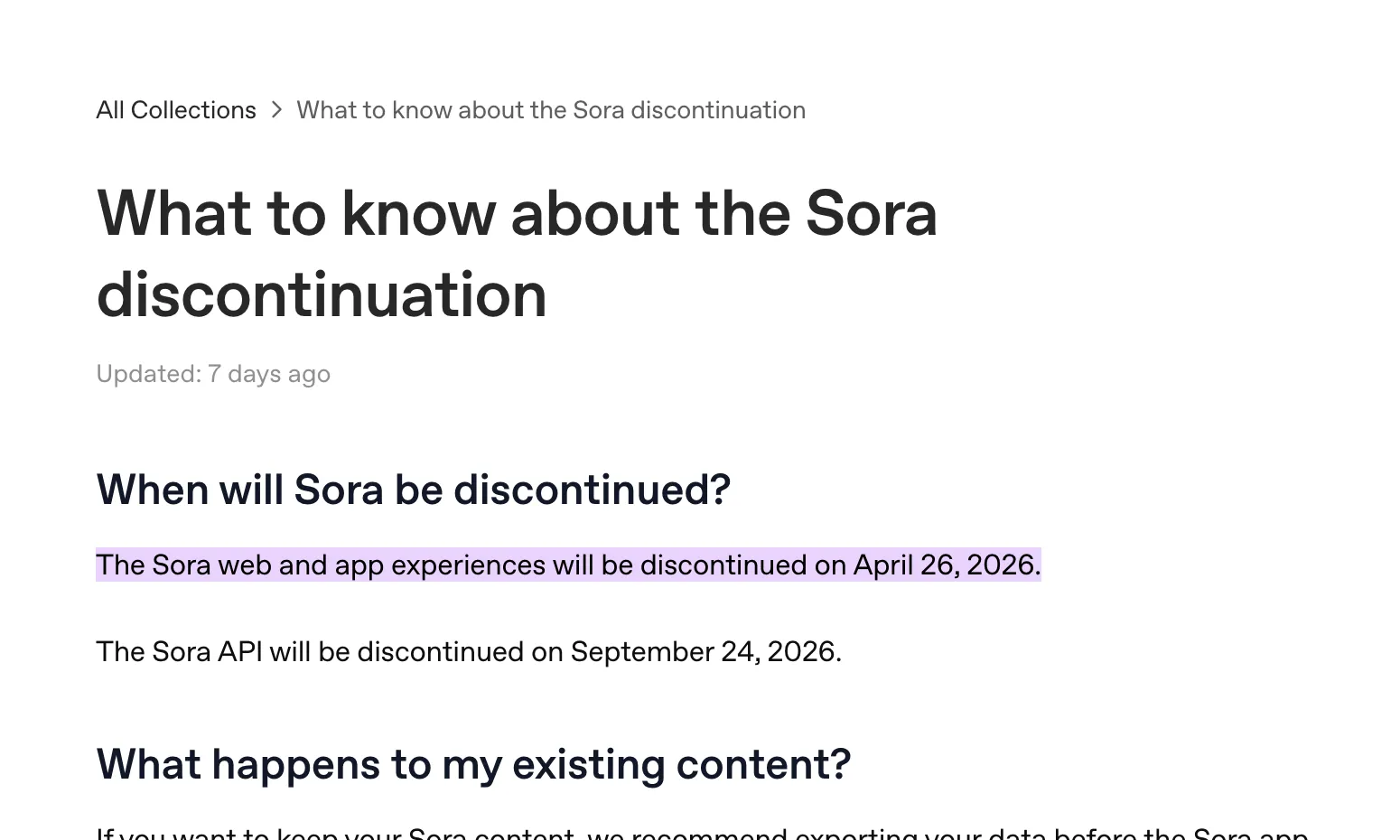
OpenAI says the Sora web and app experiences were discontinued on April 26, 2026. OpenAI's API deprecations page lists September 24, 2026 as the shutdown date for the Videos API and Sora 2 models, so that date has now passed. Sora should no longer be treated as a durable reason to choose ChatGPT Plus vs Pro in this article.
If you are comparing plans today, focus more on core ChatGPT usage allowance, Codex usage, model access, and your actual day-to-day workflow instead of video-generation perks tied to Sora.
ChatGPT Alternatives (Updated 2026 Snapshot)
The alternative-plan snapshot below is from June 2026, not a fresh September pricing or performance comparison. Check the linked providers for current offers.
| Alternative | Best For | What’s current (public pages) | Price signal |
|---|---|---|---|
| Anthropic Claude | Long-form reasoning + coding | Free / Pro / Max / Team tiers; strong model options and project workflows | Pro $20 monthly (or annual discount), Max from $100 |
| Google AI Pro (Gemini) | Google ecosystem + Deep Research | Gemini 4 Argon and 3.1 Pro in the Gemini app, Deep Research, Gemini in Workspace apps, larger storage bundles | Region-based (e.g., £18.99/month in UK page) |
| Perplexity | Citation-first research workflow | Pro positioning focuses on stronger model access and higher research limits | Check current official pricing page (varies by market/offers) |
| AI for Sheets | Spreadsheet-native automation | =GEN, =VISION, =IMAGEN formulas + Sheet Agent workflows in Google Sheets | Free + paid tiers |
Claude Max $100 vs ChatGPT Pro $100
OpenAI’s new $100 ChatGPT Pro tier now lines up more directly against Claude Max pricing. On sticker price alone, they now sit in the same decision bucket. If your work is mostly long coding sessions inside Codex and heavy ChatGPT usage, ChatGPT Pro $100 is the more direct fit. If your work is more document-heavy, writing-heavy, and context-window-heavy, Claude Max may still feel stronger depending on your workflow.
The $100 tier removes the old all-or-nothing jump from $20 to $200. OpenAI now offers Pro at $100, $200 and $500 and no longer publishes fixed Plus multipliers for each tier, so compare actual caps, credit spending and completed work for your workload rather than relying on price alone.
Best Overall for Heavy Knowledge Work: Claude

Claude remains strong for long-context reasoning, writing, and coding workflows. If your work is multi-step and document-heavy, Claude is still one of the most consistent alternatives to compare against ChatGPT.
Best for Google Workflows: Gemini
Google’s consumer AI plans now include Gemini 4 Argon and 3.1 Pro in the Gemini app, Deep Research, and tight integration with Gmail/Docs and related Google products. If your team already runs in Google Workspace, this ecosystem fit can matter more than raw model benchmarking.
Best for Research: Perplexity
Perplexity remains a practical choice when source visibility and quick synthesis are top priority. It is especially useful for exploratory research passes before deeper work in ChatGPT or Claude.
Best for Spreadsheet Execution: AI for Sheets
AI for Sheets is built for Google Sheets-native execution. It supports formula-driven workflows like =GEN(), =VISION(), and =IMAGEN(), and also includes Sheet Agent for multi-step sheet tasks.
Price
: Free plan + multiple paid tiers
Key Applications
: Data automation, business intelligence, and report generation.
ChatGPT is not limited to a generic chat window: OpenAI now also offers a Google Sheets sidebar that can build, update and explain spreadsheets. Its access and usage depend on your plan and workspace settings. AI for Sheets offers the formula workflows and Sheet Agent described above; choose based on the workflow you need, rather than assuming only one product can work inside Sheets. This article does not include a hands-on head-to-head test. Related guides: Google Gemini for Google Sheets, Sheet Agent help, Formula reference, and AI for Sheets vs GPT for Sheets vs Coefficient.
Sources
- OpenAI — ChatGPT pricing
- OpenAI Help — What is ChatGPT Plus?
- OpenAI Help — What is ChatGPT Pro?
- OpenAI Help — ChatGPT release notes
- OpenAI Developers — Codex pricing
- OpenAI Help — What to know about the Sora discontinuation
- Anthropic — Claude Pricing
- Google — Gemini Subscriptions
- Current Codex access and additional-credit options, checked September 9, 2026: https://learn.chatgpt.com/docs/pricing
- Sora API shutdown date, checked October 2, 2026: https://developers.openai.com/api/docs/deprecations
- Pro tiers and allowances, checked October 2, 2026: https://help.openai.com/en/articles/9793128-about-chatgpt-pro-tiers
- ChatGPT for Excel and Google Sheets, checked September 9, 2026: https://help.openai.com/en/articles/20001063-chatgpt-for-excel-and-google-sheets
Frequently Asked Questions
Is ChatGPT Plus still worth it in 2026?
For most individuals, yes. Plus covers strong day-to-day needs (reasoning, voice, image generation, file analysis, and research tools) at a much lower cost than Pro.
Who should pay for ChatGPT Pro?
First check whether Plus is consistently limiting you. For occasional Codex overages, compare additional credits without changing plans. Consider Pro $100 when your recurring workload justifies the higher monthly bill, not simply because you hit a cap once. Pro $200 reopened to new subscriptions on September 29, 2026 with a lower allowance unless grandfathered, and Pro $500 is the only tier with GPT-6 Astra Ultrafast and GPT-6.1 Sol Ultrafast.
Does ChatGPT Plus include Codex in 2026?
Yes. Plus includes Codex, but Free and Go also offer limited usage. Plus is the paid baseline among the plans compared in this article, not a prerequisite to try Codex. Check current plan allowances before subscribing.
Is ChatGPT Pro better than Plus for Codex limits?
Usually yes if your problem is hitting Plus caps during coding sessions. Pro is the cleaner individual upgrade path because it is designed around higher usage allowance.
ChatGPT Plus vs Business for Codex: which should I choose?
Choose Pro if you are one individual who needs more Codex headroom. Choose Business if you need team billing, shared workspace controls, admin features, and multiple users.
Are ChatGPT Codex token limits fixed?
Do not assume one fixed token limit applies forever. Codex limits can vary by plan, model, account policy, temporary promotions, and OpenAI’s current usage rules.
Is the $100 ChatGPT Pro plan different from the $200 plan in features?
The main difference is allowance: Pro $200 includes more usage than Pro $100, and OpenAI no longer publishes fixed 5x or 20x Plus multipliers. There is also a Pro $500 tier with the highest included usage, and only Pro $500 includes GPT-6 Astra Ultrafast and GPT-6.1 Sol Ultrafast. Separate model or feature caps can still differ.
Is Sora still a deciding factor between Plus and Pro?
No. The Sora web and app experiences were discontinued on April 26, 2026. OpenAI lists September 24, 2026 as the Sora API shutdown date, which has now passed. Compare Plus and Pro on current ChatGPT and Codex needs instead.
When should I use AI for Sheets instead of ChatGPT?
Consider AI for Sheets for its formula fill-down, row-by-row automation and Sheet Agent workflows. ChatGPT also has an official Google Sheets sidebar for building, updating and explaining spreadsheets. Compare the workflows and allowances you need; this article does not establish a tested winner.